 SuperFlow
SuperFlow
Bulk AI Generation for Google Flow.
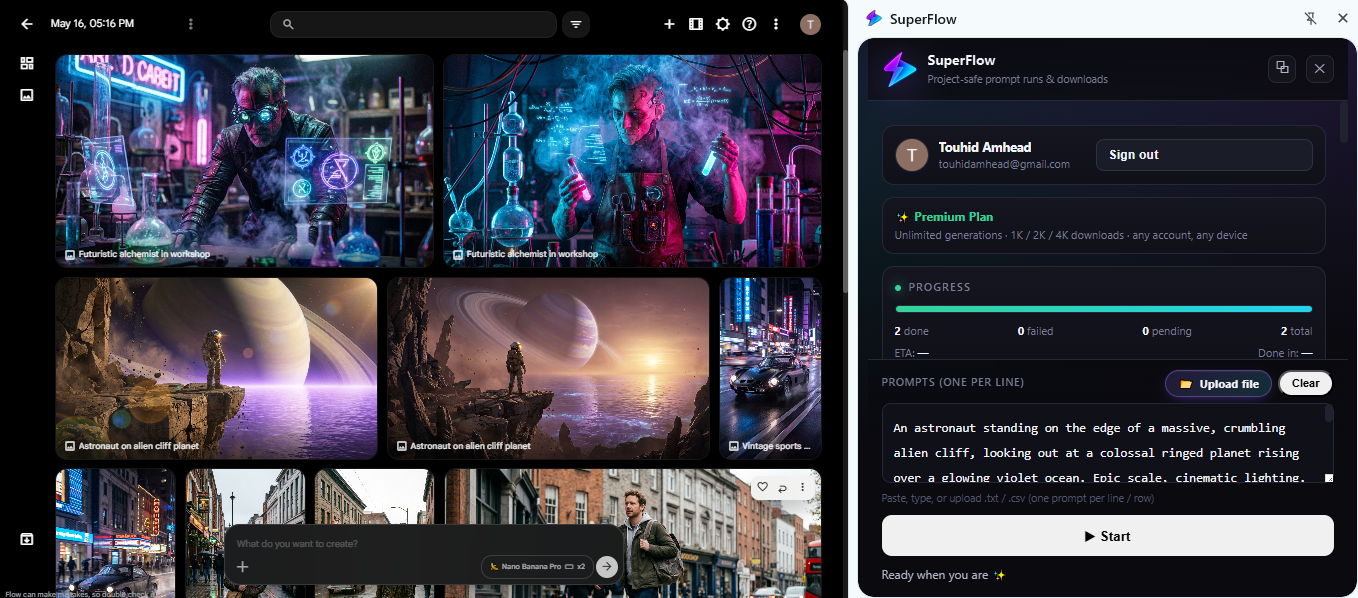
Paste your prompts. Hit go. SuperFlow injects each one into Google Flow, generates images and videos in parallel, and auto-downloads everything to your folder — hands-free.
Features
Everything you need to run Google Flow at scale
Bulk prompt queue
Paste up to hundreds of prompts. SuperFlow runs them sequentially with smart pacing and skips failures so the queue never stops.
Images & video
Generate Imagen, Nano Banana, Veo and more. Pick aspect ratios and per-prompt counts right from the side panel.
Auto-download
Every output is downloaded to your folder with clean, prompt-based filenames — no manual saving.
Human-like pacing
Adaptive delays and backoff mimic normal usage, so long batches keep running instead of tripping rate limits.
Quota-aware
Built-in daily quota tracking with friendly warnings. Free users get 20 generations a day — upgrade anytime.
Made for creators
Side panel UI, persistent prompts, live logs, and one-click sign-in with Google. Built to feel native.
How it works
From prompts to downloads in three steps
Paste prompts
Drop your prompt list into the side panel. One prompt per line.
Pick model & size
Choose Imagen, Nano Banana, or Veo, plus aspect ratio and count.
Hit start
SuperFlow injects, generates, and downloads everything for you.
Models
Works with every Google Flow model
SuperFlow does not replace Google Flow — it drives it. Whatever model your Flow account can use, SuperFlow can queue in bulk.
Veo video
Batch text-to-video generations and let each clip download as it finishes.
Imagen
High-fidelity stills across every aspect ratio Flow supports.
Nano Banana
Fast image passes, ideal for large concept and variation batches.
Frames & ingredients
Keep your existing Flow project setup — SuperFlow only fills the prompt box.
Use cases
Who uses SuperFlow every day
Faceless YouTube channels
Turn a full script into hundreds of shots overnight and wake up to a downloaded folder.
Ad creative teams
Run one product brief through dozens of prompt variations and pick the winners.
Short-form editors
Generate b-roll packs for Reels, Shorts and TikTok without babysitting the browser.
Storyboard artists
Queue every beat of a sequence in one go and review the whole board at once.
Game and app art
Produce consistent concept batches for characters, props and environments.
Agencies
Deliver client volume without hiring extra hands on the generation step.
Install
Get SuperFlow in under a minute
Install straight from the Chrome Web Store. Works in Chrome, Edge, Brave, Arc and any Chromium browser, and updates itself automatically.
- 1. Open the SuperFlow listing on the Chrome Web Store.
- 2. Click Add to Chrome, then confirm.
- 3. Pin SuperFlow to your toolbar for quick access.
- 4. Open your Google Flow project tab.
- 5. Open the side panel and click Continue with Google.
FAQ
Frequently asked questions
Is SuperFlow free?
Yes. Installing is free and free accounts get 20 generations per day. A paid plan lifts the daily limit.
Do I need a Google Flow account?
Yes. SuperFlow automates your own Google Flow session — it does not generate anything on its own servers.
Where do my files go?
Every finished image or video is saved to your browser's download folder with a clean, prompt-based filename.
Will it get my account limited?
SuperFlow paces prompts like a human, backs off automatically when Flow slows down, and pauses on unusual-activity warnings.
What data do you collect?
No prompt content and no generated media leave your browser. Sign-in is only used to check your plan and daily quota.
How do updates work?
Because SuperFlow is installed from the Chrome Web Store, Chrome updates it in the background automatically.
Support
Get in touch
Questions, feedback, or want to support the project? Send us a message — we read every one.